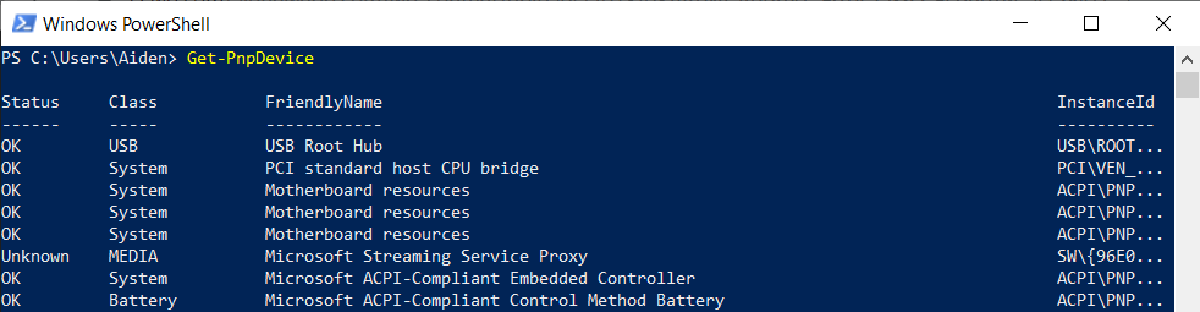

If you’re working on Windows Server Core or remotely on another computer and don’t have access to the Windows GUI, you might have trouble disabling a faulty or unwanted plug-and-play device. Thankfully PowerShell makes it easy to get, enable and disable devices in Device Manager using Get-PnpDevice, Enable-PnpDevice and Disable-PnpDevice
How to query devices#
Get-PnpDevice # Get's all PNP Devices

Get-PnpDevice -PresentOnly # Gets all PNP Devices currently attached or physically present in the system

Get-PnpDevice -FriendlyName "*Ethernet*" # Gets all PNP Devices with a name containing "Ethernet"

Get-PnpDevice -Status ERROR # Gets all PNP Devices in an errored states
How to enable or disable devices#
To enable disable a device, simply pipe the output of Get-PnpDevice to Disable-PnpDevice or Enable-PnpDevice. Please be sure your Get-PnpDevice command is targeting the correct device before piping to avoid accidentally disabling devices you’d rather keep enabled!
Get-PnpDevice -FriendlyName "*Ethernet*" | Disable-PnpDevice # Disables all PNP Devices with a name containing "Ethernet"

Get-PnpDevice -FriendlyName "*Ethernet*" | Enable-PnpDevice # Enables all PNP Devices with a name containing "Ethernet"
You could also output the instance ID to a variable for use later if you’d rather
$DeviceID = Get-PnPDevice -FriendlyName "Intel(R) Ethernet Connection I217-V" | Select-Object InstanceID
Disable-PnpDevice -InstanceID $DeviceID
Or
$DeviceID = (Get-PnpDevice -FriendlyName "Intel(R) Ethernet Connection I217-V").InstanceID
Disable-PnpDevice -InstanceID $DeviceID